
For Newcastle businesses
Google Business Profile optimisation
in Newcastle.
Give customers accurate details, useful photographs and a clear way to contact you on Google.
Tell us about your business and what you need.



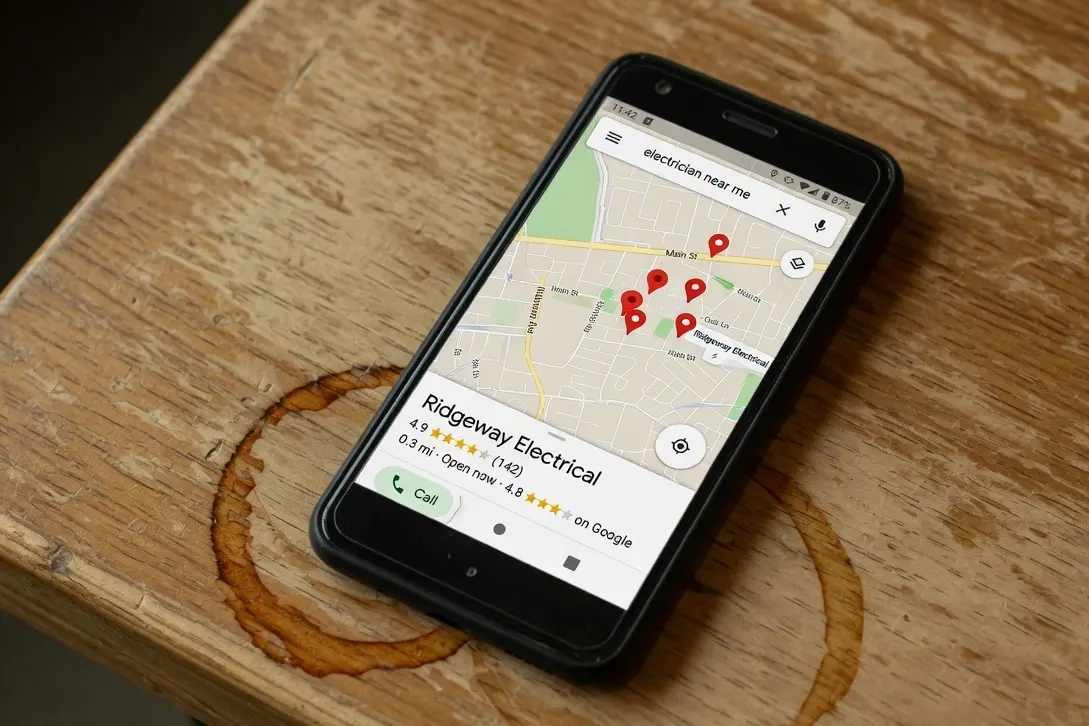
Google Business Profile optimisation at spareday
Make your Google listing useful to the next customer.
Your Google Business Profile is the listing that carries your contact details, opening hours, photographs and reviews on Google Search and Maps.
spareday provides Google Business Profile optimisation in Newcastle. We review the listing, correct incomplete or outdated information and help keep it current. This is useful whether you have recently opened, changed your services or let the profile fall behind the business.
What’s included
The details people need before they contact you.
- Business details and access
- A review of the listing’s name, contact details, website link, location and account access before changes are made.
- Categories and services
- A primary category representing the main business, relevant additional categories and a clear list of the services you actually offer.
- Hours and service coverage
- Regular and special hours checked, with the address or service-area settings reviewed against how you meet customers.
- Real business photographs
- Your premises, team and work presented with photographs you supply. These help someone recognise the business and understand what you do.
- Ongoing profile care
- Updates as the business changes, review replies and a routine for asking customers for Google reviews.
The profile itself is free. The paid work is researching, updating and maintaining it. We agree which work belongs in your quote; a complete listing is a starting point, not a promise of a particular ranking.
How it works
Check the facts before changing the fields.
We start with your existing profile so we can understand its history, access and current status. You confirm the services, customer-facing hours and how customers visit or contact you.
- Review the existing listing
- We check what customers can see and identify access, verification or information issues that need attention.
- Agree the business details
- You confirm the real-world name, address arrangements and services. Categories describe the business accurately rather than collecting every possible keyword.
- Update the profile
- We prepare the descriptions and services, add supplied photographs and correct the agreed fields. Google reviews edits before they appear.
- Maintain and report
- We keep up with changes to the business and review the profile’s available performance data, including website clicks and call-button clicks.
Google explains the fields and review process in its Business Profile editing guide. Verification or an unresolved account issue can affect what can be changed and when.
An accurate listing
Use the name and location customers know.
Google asks for the name used in the real world, such as on your signage, stationery and branding. Adding extra service or suburb words purely for search can breach its rules. The business name is not an advertising headline.
Address settings depend on how you operate. A business that travels to customers and has no customer-facing storefront should use the service-area setup and hide its address. A business that receives customers and also travels can have different requirements. See our guide for businesses without a shopfront.
We refer to Google’s business representation guidelines when reviewing the profile. If yours is suspended, the suspension guide covers that separate problem. Ordinary profile optimisation cannot promise reinstatement.
Keeping it useful
Report customer actions alongside the changes.
A useful profile report distinguishes actions on the listing from work booked by the business. Google’s call metric records clicks on the call button, rather than confirming that each call connected or became a customer. Its performance guide explains the available measures.
For where the listing appears across an area, we use Google Maps visibility checks. Profile activity and search positions answer different questions, so they should be read together.
Reviews are part of that ongoing care. Our guide to requesting Google reviews describes a practical routine. We invite honest feedback from real customers and use it to keep the listing informative.
Before choosing help, ask who will update the profile, which details need changing and what ongoing management covers. Google Business Profile management costs depend on that scope.
From clients
What clients say about working with spareday

“Huge shoutout to Reece for building my website for Hughesys Painting Services. Since it went live my phone hasn’t stopped ringing.”

“He created a stunning website for us that captures and nurtures leads with an automated email marketing system, which has filled a huge gap in the business and saved a lot of time (and money!).”

“He didn’t just build me a great website, he created an easy-to-manage system that allows me to make updates myself whenever I need to. He has spared me so much time doing all of this myself!”
“He was able to take our rough ideas, from concept through to reality. The site has provided an influx of new members, helping to keep our club viable.”
A few practical details
Before we get started.
Is Google Business Profile the same as Google My Business?
Google Business Profile is the current name for the Google My Business listing. It is separate from your website and appears across Google Search and Maps.
What access do you need?
We need appropriate access to the existing profile and confirmation of who currently manages it. Keep your password private; we work through account permissions rather than asking you to send a password.
Can you help if I work from home?
Yes, we can review how the listing should represent a business that travels to customers. The correct setup depends on whether customers are received at your address and whether the business meets Google’s eligibility rules.
Will changes put me higher on Google Maps?
Complete and accurate information can help Google understand the business. Your position also depends on the search, distance and other factors, so changing the profile does not guarantee a ranking.
What should I send for a quote?
Send the listing link, your website and a short description of what needs attention. Mention any access problem, move, name change or suspension so we can discuss the right scope.

Who you’ll work with
Hi, I’m Reece.
I run spareday from Newcastle. I’ll work through your listing with you, explain the changes and keep the website and business details consistent as the work progresses.




Find us
spareday in Newcastle.
12 Grey Street, Wickham, Newcastle NSW 2293.
Your next step
Tell us about your Google listing.
Send your profile link and what you’d like help with. We’ll discuss the work and send a free growth plan, price included.
Or call 0485 017 387.